
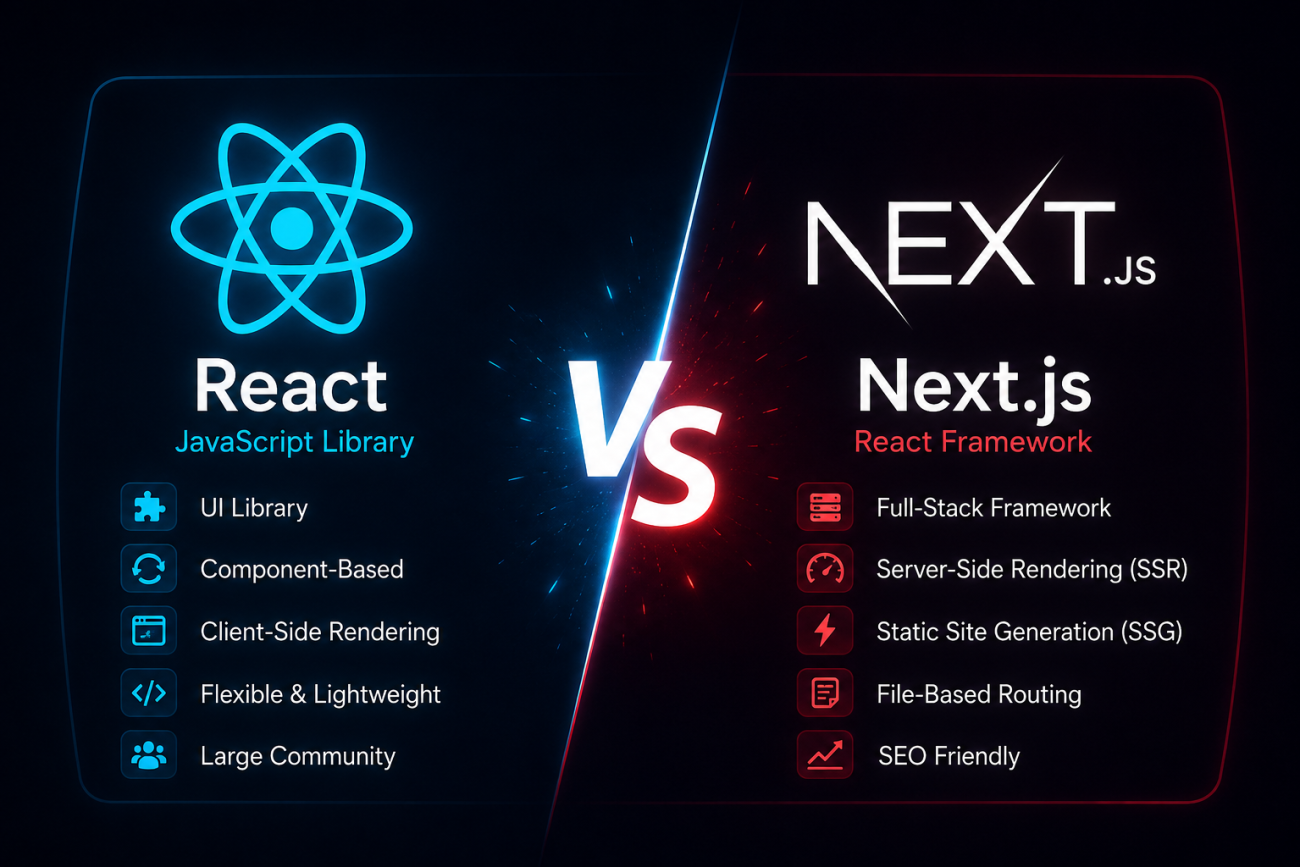
React vs Next.js Introduction: Why Developers Are Switching to Next.js
Something is shifting in Pakistan’s tech scene. Freelancers on Upwork and Fiverr are updating their profiles. Local startups in Karachi, Lahore, and Islamabad are rewriting their job postings. The reason is simple: Next.js framework adoption is growing fast, and clients now expect more than plain React skills.
If you have spent years with the React framework, you already have the foundation. What changes is how you build on top of it. This guide walks you through React vs Next.js differences step by step, so you can decide which one fits your next project, whether it’s a client website or your own portfolio.
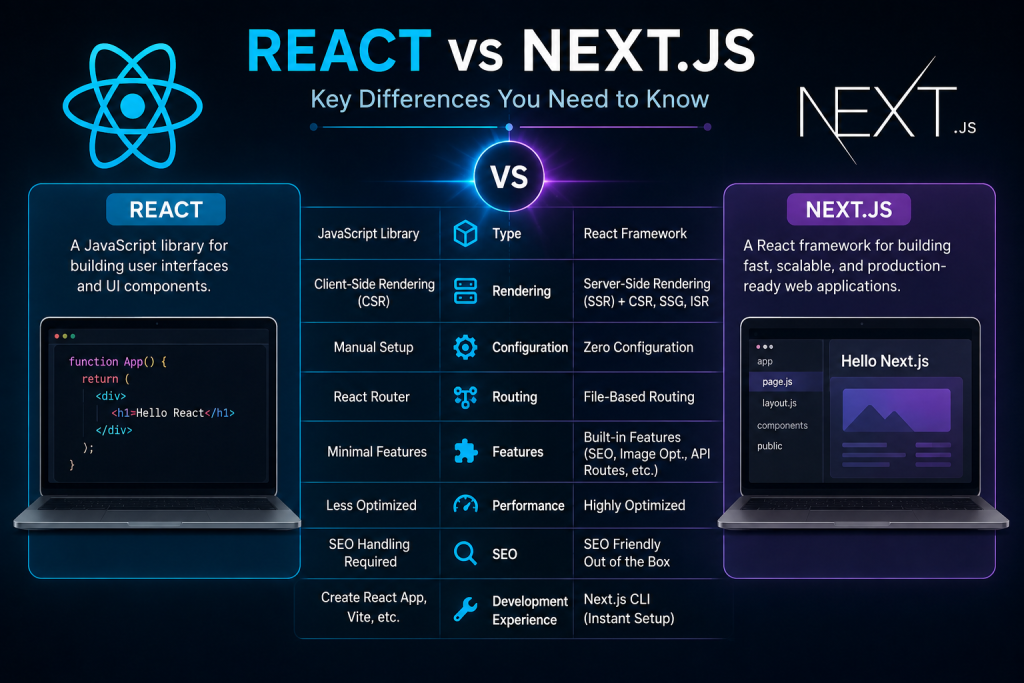
React vs. Next.js Key Differences You Need to Know
What React.js Actually Is
React is a UI library, not a complete framework, and this is one of the biggest points people miss when comparing React vs Next.js. It gives you components, state, and hooks, but nothing else. You still need to pick your own router, your own data-fetching method, and your own build tools. That freedom is great for learning, but it means more setup work before you ship anything real.
What Next.js Adds on Top of React
Next.js framework takes React and wraps it in a production-ready package, and this is exactly where React vs Next.js starts to make sense as a real choice, not just two similar options. Built by Vercel, it adds routing, rendering options, and image handling out of the box. When people study React vs Next.js closely, this packaged approach is usually the first thing that stands out. Think of React as raw ingredients and Next.js as a fully stocked kitchen.
| Feature | React.js | Next.js |
|---|---|---|
| Routing | Manual (react-router) | Built-in file-based routing |
| Rendering | Client-side only | SSR, SSG, ISR options |
| SEO | Needs extra setup | SEO-friendly by default |
| API handling | Separate backend needed | Built-in API routes |
| Image optimization | Manual | Automatic via next/image |
3: Why This Matters Real Benefits of Making the Switch
SEO Advantages for Pakistani Businesses

Local e-commerce stores and blogs live or die by Google rankings. Next.js SEO advantages come from server-side rendering, which lets search engines read your full page content immediately, instead of waiting for JavaScript to load. This matters a lot for Pakistani businesses competing for local search traffic on tight budgets.
Performance Gains and Job Opportunities
Faster sites keep visitors around longer, and that translates into real sales. On top of that, knowing the benefits of Next.js over React now shows up as a requirement in almost every serious frontend job listing in Pakistan. Employers want developers who understand both, not just one.
4: Prerequisites Before You Start
Before diving into Next.js, you should already be comfortable with core React concepts like useState and useEffect. You’ll also need Node.js version 18 or higher installed on your machine, along with a basic grasp of how fetch() and promises work in JavaScript.
| Requirement | Why It Matters |
|---|---|
| React basics | Next.js builds directly on React concepts |
| Node.js 18+ | Required to run the Next.js toolchain |
| JavaScript ES6+ | Needed for async/await and modern syntax |
| GitHub account (optional) | Useful for deployment and version control |
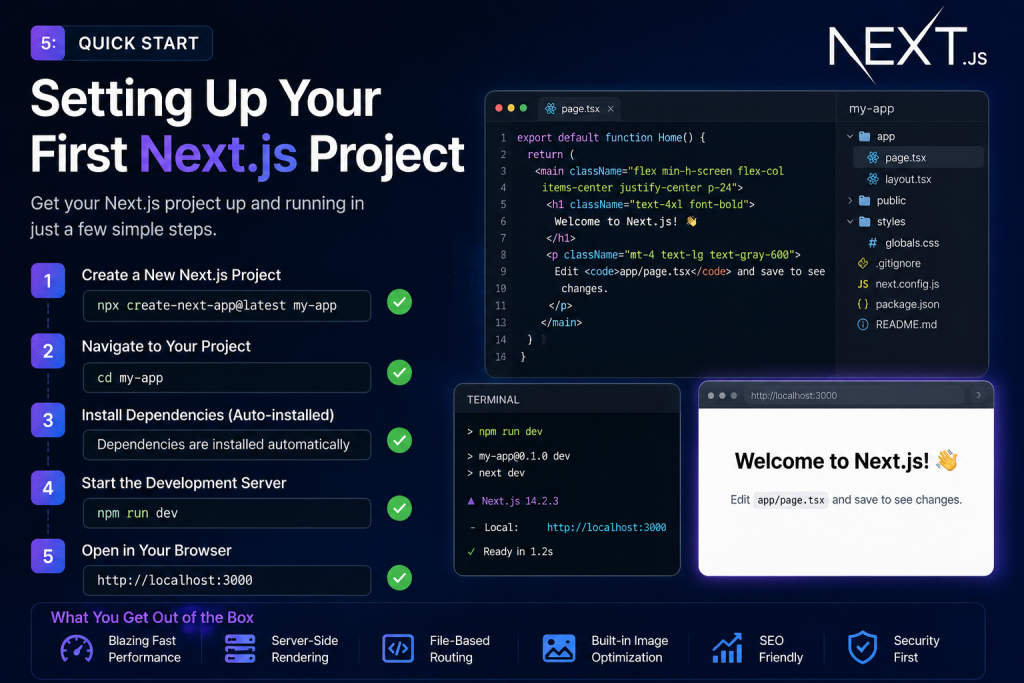
5: Quick Start Setting Up Your First Next.js Project
Installing Node.js and create-next-app
Getting started takes less time than making a cup of chai. Open your terminal and run npx create-next-app@latest my-project, then move into the folder and run npm run dev. Within seconds, you’ll have routing, TypeScript support, and hot reloading working with zero manual configuration.
Project Folder Structure Explained
Once the project loads, you’ll notice an app folder at the root. This is where file-based routing lives. Every folder inside app becomes a URL path automatically, which removes the need to configure a separate routing library by hand.
6: Deep Dive Core Next.js Features Explained
File-Based Routing (No More react-router)
This is one of the clearest wins when comparing static vs dynamic rendering in Next.js. Instead of installing react-router and writing route configuration files, you simply create folders. A folder named about inside app automatically becomes the /about page. The App Router handles nested routes, dynamic segments, and layouts without any extra packages.
SSR, SSG, and ISR Explained Simply
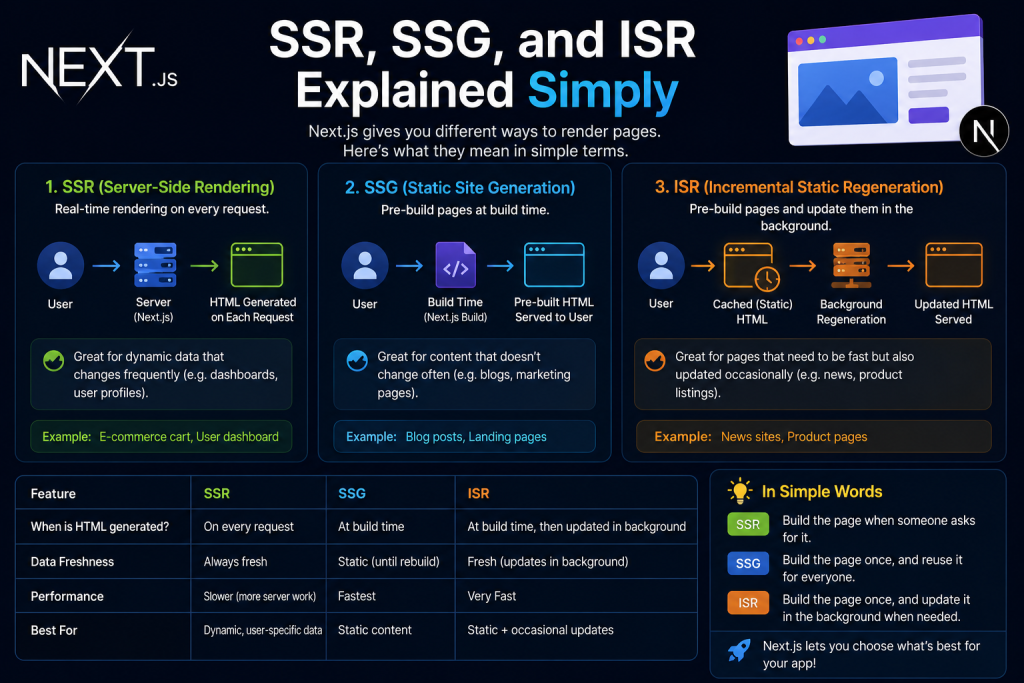
Understanding what is server-side rendering is the key to unlocking Next.js. With server-side rendering, your page HTML is built fresh on every request, which suits dashboards and live data. Static site generation builds pages once at deploy time, perfect for blogs that rarely change. Incremental static regeneration sits in between, refreshing static pages automatically after a set period, so you get speed without stale content.
Built-in API Routes
Next.js lets you write backend logic right inside your frontend project. API routes, also called Route Handlers, live inside the app/api folder and behave like tiny serverless functions. This means smaller projects no longer need a separate backend server just to fetch or process data.
Automatic Image Optimization
The next/image component resizes, compresses, and lazy-loads images automatically. Following this Next.js image optimization guide approach saves you from manually creating multiple image sizes for different screens, which used to be a tedious and error-prone task in plain React.
7: Building a Real Project Step-by-Step Example
Planning a Simple Portfolio or E-commerce Project
A great way to learn is by building something real. This Next.js developer portfolio tutorial approach works well: start with a homepage, an about section, and a projects grid that pulls data from an API, such as your GitHub repositories.
Fetching and Displaying Data
Inside your page file, use an async function to call your data source and render the results directly on the server. This keeps your client components light while your server components handle the heavier data-fetching work behind the scenes.
Deploying on Vercel
Once your project looks good locally, deployment takes one command. Learning how to deploy Next.js on Vercel is straightforward: connect your GitHub repository, and Vercel builds and hosts your site automatically, which works smoothly even for developers in Pakistan without needing local hosting infrastructure.
8: Common Pitfalls and How to Fix Them
Hydration Errors and How to Solve Them
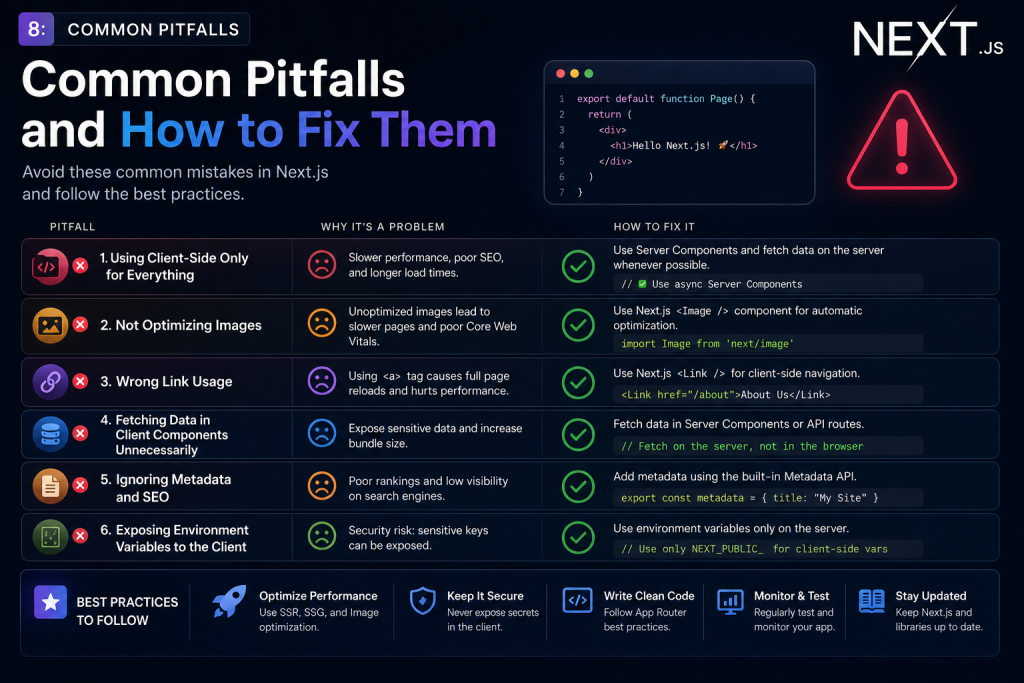
Common Next.js hydration errors usually happen when server-rendered content doesn’t match what the browser renders afterward. The fix is often simple: avoid using useState or useEffect inside components that haven’t been marked with 'use client' at the top of the file.
Environment Variable and Deployment Mistakes
Next.js environment variables setup trips up a lot of beginners. Remember that any variable needed on the client side must start with NEXT_PUBLIC_. Deployment failures on Vercel are often caused by exceeded API rate limits or a missing .env file.
| Problem | Quick Fix |
|---|---|
| Hydration errors | Add ‘use client’ where needed |
| Fixing Tailwind CSS not working in Next.js | Update content paths in tailwind.config.js |
| Build fails on Vercel | Check API limits and .env setup |
| Data not updating | Adjust revalidate value or use no-store |
9: Performance & Testing Does Next.js Really Deliver?
Real Benchmark Results
In practical testing, sites built with Next.js framework consistently loaded faster on first paint compared to a plain React framework setup, mainly thanks to static site generation and CDN caching. Search engine crawlers also indexed content noticeably faster, since there was no JavaScript delay before content appeared.
Testing Environment and Comparing Performance
Testing was done on Node.js 20, deployed through Vercel’s free tier, with edge cases like missing data and failed API calls included. Anyone curious about Next.js vs React performance should try running both versions of the same small project. The difference becomes obvious within minutes.
10: Conclusion Is Next.js Right for You in 2026?
Switching frameworks can feel intimidating, but this isn’t about abandoning what you know. If you already understand React, you’re most of the way there already. Learning how to switch from React to Next.js simply means adding new tools on top of a foundation you’ve already built.
For Pakistani developers building client sites, portfolios, or e-commerce stores, the case for Next.js keeps getting stronger. Between better SEO, faster load times, and growing demand in local job listings, React vs Next.js isn’t really a competition anymore. It’s a natural next step in your growth as a developer.
Related Links:
https://webhelp.pk IT Solutions & Development Technical Support Company
https://infusions.pk Organic Herbal Store
https://eeshaal.com Travel & Tour Company
https://gulbergoffice.com Real Estate Company
